

Updated: 13 Oct 2026
Restaurant Management Systems
To run a successful restaurant, you need to do more than serve good food. Paying attention to customer service, keeping the restaurant pristine, and creating a welcoming atmosphere are all important. You should also keep an eye on your finances, watch your expenses, and promote your restaurant to bring in customers. When you focus on all these areas, your guests are more likely to enjoy their visit and return again.
But which system is right for your business? Some platforms focus on orders and payments, others specialise in inventory or reservations, and enterprise systems connect multiple locations. This guide compares seven options, explains what they do, examines publicly available UK pricing and shows you how to choose a system that supports profitability rather than simply adding another monthly expense.
Key Takeaways
- The best option for beginners is Square for Restaurants, as it provides a free software plan although payment-processing fees do apply.
- The best choice for integrated restaurant operations is to compare Lightspeed Restaurant, Toast and other systems that are focused on restaurants with particular service needs.
- Best for UK-focused EPOS: Epos Now and Zonal are worth investigating, depending on your venue and operational complexity.
- Best for specialist stock control: MarketMan is an inventory and purchasing platform to consider alongside your POS.
- Best for enterprise operations: Oracle MICROS Simphony is an option for complex, multi-location businesses.
- Best purchasing decision: Compare total ownership costs, integrations, support, reporting and contract terms rather than headline subscription prices.
Pricing and availability are based on publicly accessible provider information reviewed in October 2026. Prices are subject to change and the quotations may leave out hardware, processing fees, implementation costs and optional modules.
What Is a Restaurant Management System?
A restaurant management system (RMS) is a digital platform that helps restaurants manage and coordinate activities such as sales, orders, stock, staffing, reservations and financial reporting.
Functionality varies by provider, with some systems offering an integrated suite and others linking specialist applications to a central point-of-sale (POS) platform.
It is important to understand these differences when comparing products.
- POS or EPOS: Records orders, processes payments and provides sales reports.
- Kitchen display system (KDS): Sends orders to kitchen screens, helping the team track preparation and order status.
- Inventory management: Tracks ingredients, purchasing, stock movements, recipe costs and waste.
- Staff management: Supports scheduling, attendance, permissions and, where available, labour reporting.
- Customer relationship management (CRM): Helps manage guest information, loyalty and marketing.
- Reservation management: Handles bookings, table availability, waitlists and guest communications.
- Financial reporting: Helps reconcile sales and understand revenue, costs and operating performance.
These components may be integrated or supplied separately. A restaurant POS system does not automatically provide accurate ingredient-level costing, payroll or a complete profit and loss statement.
For restaurants in the UK, it’s important to understand the difference between two types of software: the software that helps run the restaurant and the software that ensures you are following tax laws. Because tax rules vary, it’s a good idea to talk to your accountant or your financial adviser to understand what you need. Also, check the official HMRC guidance before trusting what a Supplier says about their software’s tax compliance.
How We Selected These Seven Restaurant Management Systems
This is a practical shortlist, not a statistically verified ranking of the UK’s seven most popular systems. These products serve different needs and aren’t all direct competitors.
The selection looks at:
- Being suitable for small restaurants and hospitality businesses.
- Important features for managing sales and restaurant operations.
- The ability to connect sales, inventory, staff, and financial records.
- UK availability and publicly accessible pricing information.
- Flexibility for different restaurant sizes and service styles.
- The importance of support, training, data access and total cost.
Where a provider does not publish a reliable UK price, is to get a quotation directly from the supplier rather than relying on outdated figures from comparison websites.
1. Lightspeed Restaurant
Best suited to: Restaurants seeking restaurant-focused POS functionality, reporting and tools to support more complex service. Lightspeed Restaurant is a restaurant EPOS platform designed to support order management, table plans, menu configuration, payments, and reporting. Additional functionality and integrations depend on the plan and configuration.
For an independent restaurant, the key question is whether its reporting and available integrations provide enough information to improve operational decisions.
For example, a manager might compare sales by menu item, identify low-selling dishes, and investigate whether a popular dish delivers an acceptable contribution after ingredient costs.
What to check before buying
- Whether your proposed plan supports the inventory and recipe-costing depth you need.
- Whether kitchen displays, handheld ordering and relevant integrations cost extra.
- Whether your payment provider and accounting software are supported in the UK.
- Whether reports can be exported in a format your accountant can use.
UK pricing: Confirm directly with Lightspeed. Its published pricing information has included euro-denominated plans, so historic prices should not be treated as a verified current UK quotation.
Verdict: A candidate for independent restaurants that need more than basic checkout functionality, particularly where table service, reporting and integration requirements justify a more developed platform.
2. Square for Restaurants
Best suited to: Cafés, food trucks, takeaways, pop-ups, and smaller restaurants that need an accessible starting point.
Square for Restaurants provides POS functionality, including order entry, menu management, table management and sales reporting.
Its UK pricing page publicly lists the following plans:
Plan Published software price
Free £0 per month
Plus £69 per month per location
Premium Custom pricing
The Free plan still incurs payment-processing fees. Square publishes an in-person processing rate of 1.75% for standard UK card transactions. Hardware, optional tools and some additional services may cost extra. Check the official Square for Restaurants pricing page for the latest terms.
The Plus plan adds features such as course management, live sales reporting and enhanced support. Square also offers additional tools for staff management, loyalty, marketing and inventory.
For a small restaurant, the appeal is starting with relatively low fixed software costs and adding capabilities as the business grows.
What to check before buying
- Make sure the Free plan includes the table-service features you need.
- Ensure that your hardware and printers are compatible.
- Find out whether offline payments meet your needs, and check for any restrictions.
- Make sure that there are no additional charges for advanced inventory, loyalty, or staff tools.
If you want a simple, easy setup, it’s a good starting point; but if you run a complex, full-service business, test course management, bill splitting, kitchen workflows and reporting before committing.
3. TouchBistro
Best suited to: Full-service restaurants considering a restaurant-focused POS with table-service functionality.
TouchBistro is known for its restaurant POS offering, which includes features designed for order taking, table management, and service workflows. Depending on the package and configuration, operators may also need separate applications for inventory, reservations, payments or other back-office requirements.
For a seated restaurant, the most important test is how well the system handles a busy service.
Can servers record orders accurately? Can the kitchen see changes immediately? Can staff split bills, manage courses, and handle unavailable menu items without creating confusion?
These practical details matter more than a long list of advertised features.
What to check before buying
- Whether the provider currently accepts and supports UK restaurant customers.
- Which payment providers and hardware the provider supports in the UK.
- Whether the offline operation meets your real requirements for ordering and paying.
- What integrations are available, and do they require any extra fees?
- What is included in onboarding and in the ongoing technical support?
Regarding UK pricing, it is not possible to reliably confirm a standard current UK price from publicly available information at the moment. You should request a written quotation and verify UK availability before adding it to your final shortlist.
Verdict: It is worth looking into for those restaurants that place a priority on table-service workflows, as long as the local availability, support and integration requirements are established.
4. Epos Now
Best suited to: Independent restaurants, pubs, cafés and takeaways seeking a configurable EPOS system.
Epos Now offers POS solutions for hospitality businesses, covering sales, stock, reporting, and integrations. Its UK website also describes multi-site capabilities and a range of hardware options.
The provider’s advertised offer includes a POS hardware bundle from £299, down from a previously stated price of £849. This is a promotional hardware price, not a complete measure of the cost of running a restaurant system. Check the Epos Now UK website for current offers and terms.
For an independent operator, a configurable system can help the business start with essential functionality and add modules as needs change.
However, modular pricing can make comparisons difficult. A low entry price may not include the inventory, kitchen screens, integrations or support package required for daily operation.
What to check before buying:
- The ongoing costs of subscriptions and payment processing.
- Whether it includes inventory and kitchen display functions.
- What accounting and delivery integrations are supported?
- Hardware ownership, contract length, renewal terms, and cancellation terms.
- Whether technical support is available while the restaurant is open.
In the UK, hardware offers are publicly advertised, but the total cost of the software and operating system varies by package. Request a detailed quotation before you make your final decision.
Overall, it is a good choice for independent operators who want a configurable EPOS system, especially since the overall cost and support options are clearly stated.
The Ultimate Guide to Fast Food Restaurant Management Systems
5. Zonal
Best suited to: UK hospitality operators that need established hospitality technology and structured operational controls.
Zonal is a UK hospitality technology provider offering systems designed for restaurant and hospitality operations. Its products can be relevant where businesses need connected EPOS, operational reporting and other hospitality-management capabilities.
For an independent restaurant, the decision should come down to how well the system fits the venue’s daily workflows—not the provider’s size or the number of features in its product portfolio.
A single-site restaurant may not need complex central controls. A restaurant group, on the other hand, may value consistent menus, shared reporting and oversight across multiple locations.
What to check before buying
- Which Zonal products are appropriate for your type of venue.
- Whether the quotation covers all required hardware and software.
- How inventory, accounting, reservations and other applications connect.
- What implementation, training and ongoing support involve.
- Whether the system provides the reports, managers need to control costs.
UK pricing: A current standard price was not reliably established from the available public information. Request a tailored quotation.
Verdict: Worth considering where UK hospitality requirements, operational integration and the ability to support future growth are important.
6. Toast POS
Best suited to: Restaurants seeking a connected platform for orders, payments, kitchen operations and reporting.
Toast has an official UK restaurant POS offering and publishes UK-specific prices.
Its current published starting prices are:
Plan Published starting price
Starter £80 per month
Essentials £150 per month
Custom Quotation
Starter includes restaurant POS functionality, reporting, integrated payment processing and hardware configuration and installation support. Essentials adds a kitchen display system and handheld POS devices. Additional hardware, integrations and other options may incur further charges.
Check the official Toast UK pricing page for the current package details.
Toast’s integrated approach can appeal to operators who want front-of-house and kitchen workflows connected within one platform. Its value depends on whether the included functionality matches the restaurant’s needs without requiring too many extra modules.
What to check before buying
- The full hardware and installation costs for your venue.
- Payment-processing rates and the terms attached to integrated payments.
- Which inventory, accounting, payroll and delivery integrations are available.
- You need separate products for staff scheduling and other back-office requirements.
- The method by which you can export your data if you switch to a new provider.
Verdict: A relevant UK option for independent restaurants seeking an integrated restaurant POS, particularly where kitchen displays and handheld ordering are priorities. Compare the full package with competing quotes rather than judging it on the subscription alone.

7. Oracle MICROS Simphony
Best suited to: Large, complex or multi-location restaurant operations.
Oracle MICROS Simphony is an enterprise restaurant POS platform designed for hospitality businesses with more complex operating requirements. It is most relevant in environments where centralised controls, multi-location management, integrations, and consistent operating procedures matter.
For example, a restaurant group may need to update menus across several locations, centrally control user permissions, and compare sales performance between sites. Those requirements are different from those of a small independent café.
However, enterprise functionality can add implementation, training, and support requirements. A larger platform is not automatically better for a smaller restaurant.
What to check before buying
- Whether the proposed deployment supports your exact restaurant configuration.
- How offline operation, local networking and kitchen routing work.
- What integrations are available for accounting, inventory and workforce management.
- Implementation, hardware, support and ongoing licensing costs.
- Whether the advantages outweigh the extra operational complexity.
There is no reliably established standard price for the UK market based on the publicly available information. You should request a quotation from Oracle or from an authorised implementation partner.
Verdict: It is worth looking into if you are carrying out complex, multi-location operations. However, when dealing with a single independent restaurant, you should carefully compare the cost and complexity with that of a more straightforward platform.
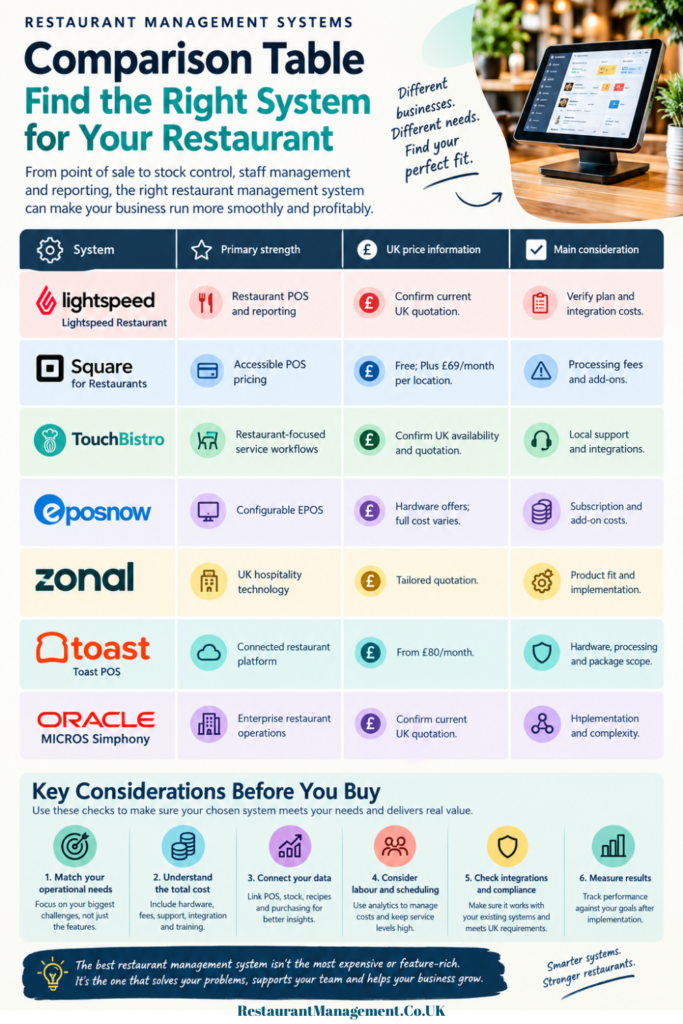
Restaurant Management Systems Comparison Table
The following table summarises the practical differences. It does not imply that every provider offers every feature in every package.
| System | Primary strength | UK price information | Main consideration |
| Lightspeed Restaurant | Restaurant POS and reporting | Confirm current UK quotation | Verify plan and integration costs |
| Square for Restaurants | Accessible POS pricing | Free; Plus £69/month per location | Processing fees and add-ons |
| TouchBistro | Restaurant-focused service workflows | Confirm UK availability and quotation | Local support and integrations |
| Epos Now | Configurable EPOS | Hardware offers; full cost varies | Subscription and add-on costs |
| Zonal | UK hospitality technology | Tailored quotation | Product fit and implementation |
| Toast POS | Connected restaurant platform | From £80/month | Hardware, processing and package scope |
| Oracle MICROS Simphony | Enterprise restaurant operations | Tailored quotation | Implementation and complexity |
Unleash The Best Restaurant Management System For Profitability
How to Choose the Right Restaurant Management System
Choosing the right software starts with identifying the operational problem you need to solve.
1. Start with your three biggest problems
List the issues that consume management time or create avoidable costs.
For example:
- Stock records are inaccurate, and there is unexplained food waste.
- Placing orders can be slow, or mistakes may slip between the front of the house and the kitchen.
- Spending too much time arranging the staff rota.
- Reconciling delivery sales figures with payment settlements is difficult.
- Limited visibility of sales, margins and daily performance.
Rank these problems by their commercial impact. A restaurant struggling with stock control may benefit more from inventory software than from a new loyalty programme.
2. Check whether the system can improve cost control
Technology is useful when it produces information that supports a better decision.
Food cost percentage measures food cost against food sales:
Food cost % = (Food cost ÷ Food sales) × 100
For example, if food cost is £9,000 and food sales are £30,000, the food cost percentage is 30%.
A POS records what has been sold, but accurate food-cost reporting also depends on recipe costs, purchasing records and stocktakes.
Labour cost percentage shows how much money you spend on workers compared to total sales. You can calculate it like this:
Labour cost % = (Total labour cost ÷ Sales) × 100
For example, if you spend £10,500 on labour and your sales are £35,000, then the labour cost percentage is 30%.
When you review labour costs, use the same definition and compare similar time periods. Also consider worker productivity. Cutting hours might save money at first, but if you don’t have enough staff, it can hurt service, sales, and staff retention.

3. Understand prime cost and gross profit
Prime cost combines cost of sales with labour costs. It is useful because these are two major operating cost areas that managers can influence.
A restaurant management system can support this analysis, but the quality of the result depends on how accurately sales, stock, purchasing and payroll data are recorded.
Also distinguish gross profit from net profit. Gross profit is sales revenue less the relevant cost of sales. Net profit reflects the wider expenses of running the business. A restaurant can report strong sales and gross profit while still struggling because of rent, energy, finance costs or other overheads.
Ask the Supplier to show you the reports they provide. Also, check with your accountant to make sure these reports have the financial information your business needs.
4. Test integrations before committing
Your POS should work with the systems that matter to your restaurant.
Depending on your business, these may include:
- Accounting software.
- Inventory and purchasing tools.
- Payroll and staff scheduling.
- Delivery platforms.
- Reservation and CRM applications.
- Online ordering and payment services.
Check what data moves automatically, how frequently it synchronises and what happens when a connection fails. Confirm whether the integration is included in the subscription or carries an additional charge.
5 Reasons Why You Need An Online Restaurant Management System
5. Calculate the total cost of ownership
Do not compare one provider’s software subscription with another provider’s complete package. Request itemised quotations covering hardware, subscriptions, card processing, implementation, training, support, integrations and contract terms.
When calculating the annual cost, you should use your actual sales figures and payment method. Also account for any additional programmes needed for the system to work properly.
6. Run a realistic trial
Before you buy, take time to test how the system works with your food menu and daily tasks. See how well it handles order changes, processes refunds, splits bills between people, talks to the kitchen, adjusts inventory (stock of food and supplies), completes end-of-day work, and creates reports for management.
Involve the staff who will use the system during service. Their feedback can reveal problems that are not apparent during a sales demonstration.
Set baseline measures before implementation, then review order errors, stock discrepancies, reporting time, labour productivity and customer complaints after an agreed period.
Related articles:
Fast Food Restaurant Management Systems
Best Restaurant Management System
Online Restaurant Management System
Best Restaurant Inventory Management System
Frequently Asked Questions
What are the top 10 restaurant management software options?
There is no independently verified top-ten ranking established here. Products worth investigating include Lightspeed Restaurant, Square for Restaurants, Epos Now, Zonal, Toast, TouchBistro, Oracle MICROS Simphony, MarketMan and TheFork.
What is the best management software for restaurants?
The system that is best for you will depend on the size of the restaurant, the type of service, the budget, and the operational priorities. Square provides an easy method of getting started; if you need restaurant-specific POS features, then you should compare Lightspeed and Toast; you should also look at Epos Now and Zonal for UK hospitality operations.
What system do most restaurants use?
All restaurants use no single system. Adoption varies by market, business size and service model. Without reliable, current UK market-share data, it would be misleading to identify one provider as the most widely used.
What is the best CRM for restaurants?
The best CRM depends on whether you prioritise guest profiles, loyalty, marketing, reservations or repeat bookings. TheFork Manager is a specialist option to investigate for reservation and guest-management workflows. Before adopting a CRM, check data-protection requirements, consent arrangements, and integration with your POS.
Can I get restaurant management software for free?
Yes, Square for Restaurants has a Free plan that costs £0 each month. However, you still pay fees to process payments. You might also have to pay extra for hardware and optional tools. Other companies might offer trials or quotes instead of a long-term free plan.
Is a restaurant management system the same as a POS?
A POS, or Point of Sale system, mainly handles order entry and payment processing. An RMS, or Restaurant Management System, is a broader system that connects many parts of a restaurant, including the POS, inventory (food and supplies), kitchen operations, staff management, reservations, and reporting.
Is TheFork Manager a restaurant POS system?
TheFork Manager helps with restaurant bookings, managing tables, and tools for dealing with guests. It is not meant to replace a complete POS system that takes care of orders and payments. If you plan to use both, check the available connections between them.
Does a restaurant management system improve profitability?
It can improve profitability by helping managers identify sales trends, monitor costs, reduce avoidable errors, and improve operational consistency. However, software alone does not guarantee savings. The results depend on how good the data is, how well the staff is trained, and whether the managers take action based on the information.
Conclusion: Choosing the Right Restaurant Management Software
If you’re choosing restaurant management software, select one that simplifies your daily tasks rather than just offering a long list of features. First, identify the key problems you face, such as managing take-away orders, reducing food costs, increasing the speed at which tables can be cleared, or organising staff schedules. Then choose software that tackles these problems and is easy for your team to use.
Before coming to a final decision, carry out a thorough inspection. While subscription fees are only one part of the cost, the total price may rise because of expenses relating to hardware, payment processing, integrations, support, and staff training.
Ask the suppliers to provide a clear explanation of all the costs, the contract terms, and any extra charges. Moreover, make sure that the system satisfies your business’s legal and operational requirements.
Also consider how well the software connects your sales data with stock, purchasing, recipes, and labour costs. When these figures work together, you can get a clearer picture of where your money is going and make better-informed decisions. Once the system is up and running, review its performance against your original goals. Are you reducing waste, controlling labour costs, improving service or saving management time? If the results fall short, investigate what needs to change.
Recommended Next Steps
Start by shortlisting two or three systems that suit your restaurant’s needs and budget. Arrange demonstrations using realistic examples from your day-to-day operations, rather than relying on a standard sales presentation. Ask each Supplier for a detailed quotation, review the contract carefully, and, where possible, speak to existing customers.
The best restaurant management system helps you run a more efficient, profitable operation without adding unnecessary complexity or cost.
Restaurant Management Guide – How To Best Manage A Successful Restaurant